🔒 Amazon SP-API fees: timeline delayed by Amazon
In our previous updates, we notified you about Amazon's new SP-API fees and the options available, including the recommended free Private App migration path and the paid Public App option with billing originally expected to start March 31, 2026.
Amazon has now announced that it is delaying the fee implementation and will share updated timelines in the fall.
This is consistent with what many of us have experienced with Amazon in the past, where timelines and requirements shift late in the process. Amazon's note explicitly mentions feedback from solution providers regarding complexity in planning and forecasting as the driver behind this delay.
What this means for you right now:
-
No immediate deadline pressure. The previously expected March 31, 2026 cutoff is no longer in play.
-
No pricing change from Ignite at this time. Your Amazon FBA integration continues as per your existing pricing plan.
-
No per-store, per-month fee for using the Ignite public app from the Amazon Seller marketplace until further notice.
How we recommend you proceed:
We do not recommend stopping Private App migration entirely. Instead, we recommend treating it as a planned transition rather than an emergency push. A steady, staged approach helps you avoid an "all-at-once" scramble if Amazon issues another abrupt update, and lets you standardize Private App setup as a repeatable onboarding step for every new seller.
-
New sellers: default to Private App setup going forward
-
Existing sellers: migrate in batches over the next few months based on your internal bandwidth
We will continue monitoring Amazon's updates and will communicate again as soon as Amazon publishes revised effective dates and the final fee structure.
🛒 Amazon FBM integration: rebuilt with better rate access
Amazon FBM was previously available in Ignite, but the underlying integration method we were using had a limitation: it was not passing through all the cheapest shipping rates available on Seller Central. This meant operators were not always seeing the most competitive options when fulfilling FBM orders.
This has now been resolved. The FBM integration has been rebuilt, and Ignite now surfaces the full range of rates available through Seller Central, so your team can consistently choose the best shipping option for each FBM order.
In addition to fixing the rate issue, the new integration also brings:
-
Automatic product and order sync once the merchant's FBM store is connected
-
Fulfillment tracking pushed back to Amazon when a shipment is completed, keeping the marketplace in sync without manual updates
-
FBM reuses the existing FBA product catalog, so there are no duplicate product listings to manage
-
Orders are filterable by source, so your team can distinguish FBM orders from FBA and other channels at a glance
Note: FBM connection requires an active FBA integration for the merchant. If FBA is not set up, Ignite will prompt you to connect it first.
🟣 WooCommerce integration is now live
Ignite now connects directly to WooCommerce stores, adding another channel to the platform alongside Shopify, Amazon, and eBay. For 3PLs and prep centers serving merchants on WooCommerce, this means one less disconnected system to manage.
Once connected:
-
Products and orders sync into Ignite from the WooCommerce store
-
Order updates flow in real time, so your fulfillment team always sees the latest state
-
Shipment tracking is pushed back to WooCommerce when fulfillment is completed, keeping the merchant's store updated without manual entry
This is especially useful for operators whose clients sell across both marketplaces and their own webstores. You can now manage Amazon, Shopify, eBay, and WooCommerce fulfillment from one place.
📥 Bulk upload inbound orders
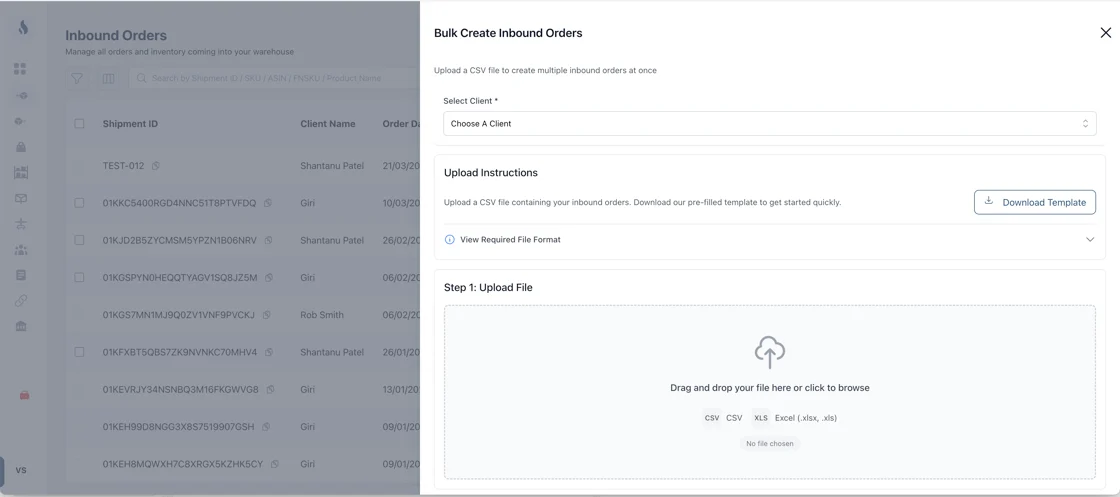
For operators receiving large volumes of client inventory, creating inbound orders one at a time was slowing things down. Ignite now supports bulk upload of inbound orders using a CSV template, so you can import hundreds of orders at once.
The system validates every row automatically and shows you which lines are valid, which have warnings, and which have errors, so issues are caught before anything reaches the warehouse floor.
A few things the system handles automatically:
-
Rows sharing the same Order ID are grouped into a single multi-SKU inbound order
-
Duplicate SKUs within an order are merged with combined quantities
-
Previously imported Order IDs are blocked from being created again
Errors are surfaced per row with clear reasons on hover, so your team knows exactly what needs fixing
⚠️ Order exception handling for unknown SKUs
Ignite now has a structured way to handle orders that reference products not yet in the catalog, instead of requiring manual investigation when something does not match.
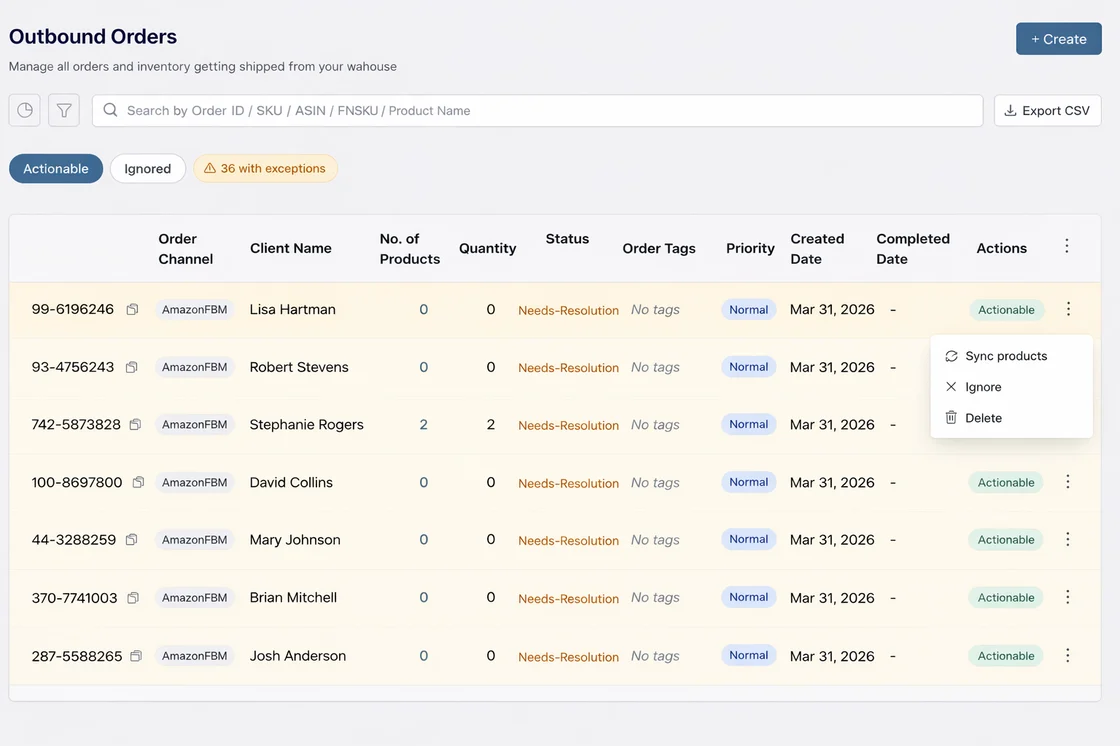
When an order arrives from any connected channel and one or more SKUs are not found in the Ignite product catalog, the order is now created in a "Needs Resolution" state with clear visual indicators:
-
Amber-highlighted rows in the Outbound Orders list make exception orders immediately visible
-
A counter badge near the filter pills shows how many orders currently need attention
-
Each row shows exactly which SKUs are missing, so your team knows the issue at a glance
To resolve, operators can trigger a product sync directly from the order row's action menu, scoped to the correct client store. Once the sync completes, Ignite automatically checks if the previously missing SKUs are now in the catalog and transitions the order to "Ready" on its own.
This also works in the background. If a missing SKU arrives through a scheduled product sync, the exception clears automatically without any manual action.
✨ Quality of Life Improvements
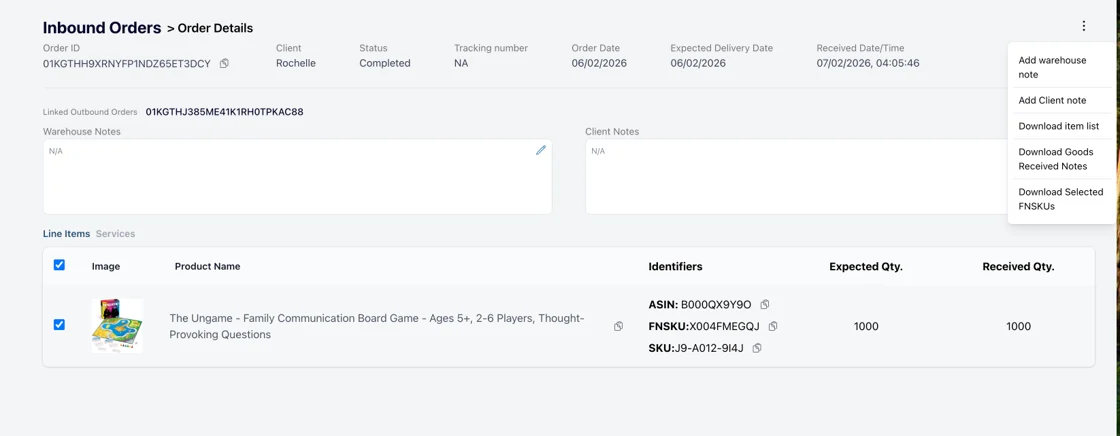
FNSKU label download from the receiving screen You can now download FNSKU labels directly from the inbound order detail page during receiving. Select the Amazon products you need labels for using checkboxes, and download them from the actions menu, without navigating away or looking them up in Seller Central.
Zebra printer support Ignite now supports printing to Zebra thermal printers, so your warehouse team can print labels directly from Ignite workflows without workarounds or additional driver configuration.